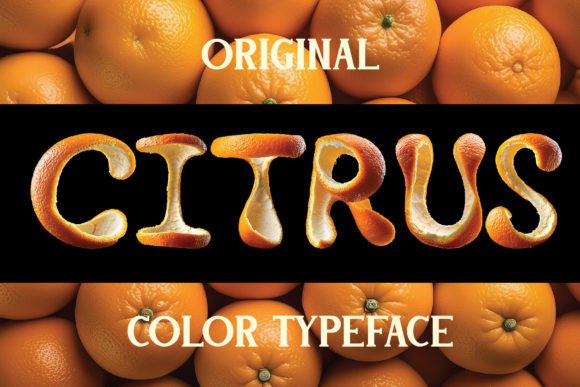
Citrus: A Vibrant Color Font for Eye-Catching Design
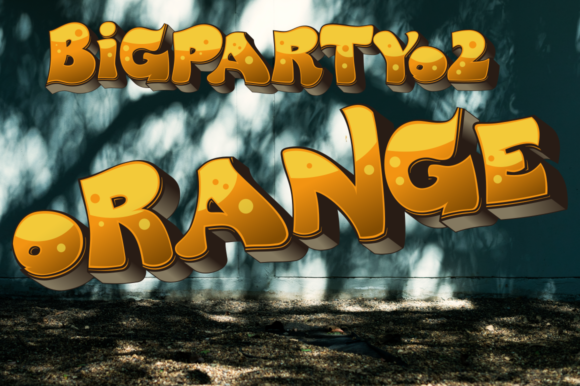
Imagine a font that doesn't just spell out words but bursts with the fresh, tactile energy of a sun-ripened orange. Citrus is exactly that—a striking color bitmap OpenType-SVG font where every letter is artfully crafted from realistic orange peel textures. For graphic designers and visual creators, this is more than a typeface; it's a powerful creative asset designed to inject immediate visual impact and a unique, organic aesthetic into any project.
Understanding the Citrus Color Font
Citrus represents a modern evolution in typography. As a color OpenType-SVG font, it embeds high-resolution, multi-colored imagery directly into the font file, moving beyond the single-color limitations of traditional fonts. This allows for incredibly detailed, photorealistic designs within a standard text workflow. The included OTF file boasts a 500px height resolution, ensuring clarity in digital applications, while the separate PNG file with a transparent background at approximately 4000px height provides exceptional flexibility for print and large-scale design.
Technical Specifications and Compatibility
It's crucial to understand its technical nature for a smooth design workflow. Citrus is compatible with professional design software that supports OpenType-SVG, including Adobe Photoshop, Adobe Illustrator, Silhouette Studio, and Inkscape. This makes it an ideal tool for digital marketing assets, social media graphics, and web design elements. However, note that this color font is not compatible with Cricut machines or standard vector-based cutters, as they require simple outlines rather than embedded bitmaps. Always check the provided character screenshot to confirm the available English letters and basic punctuation meet your project's needs.
Practical Applications for Maximum Visual Impact
The true value of Citrus lies in its application across diverse creative projects. Its vibrant, textured appearance naturally commands attention, making it a strategic choice for designs aiming to stand out.
- Branding and Logo Design: Use Citrus for a brand that wants to communicate freshness, vitality, or a playful, organic identity. It’s perfect for juice bars, health food brands, summer festivals, or children's products, instantly conveying a specific mood and color palette.
- Marketing and Social Media Graphics: Create scroll-stopping headlines for digital ads, Instagram stories, or promotional banners. The font's inherent visual hierarchy ensures your key message is not only read but felt, boosting user engagement.
- Packaging and Editorial Design: Apply Citrus to product packaging, magazine headlines, or cookbook layouts to evoke appetite and energy. It adds a layer of tactile realism that standard fonts cannot achieve.
- Web and UI Design: Strategically use Citrus for hero section titles or call-to-action buttons to create a memorable user experience. It can define the aesthetic of a landing page, aligning with modern design trends that favor bold, expressive typography.
Tips for Effective Integration into Your Design Workflow
To leverage Citrus effectively, consider these professional design principles:
Context is Key: This font is a display typeface, meant for headlines, logos, and short bursts of text. Its intricate detail can reduce legibility in long paragraphs. Pair it with a clean, simple sans-serif or serif font for body copy to maintain readability and create a balanced visual hierarchy.
Scale and Resolution: Always test the font at the size it will be viewed. The 500px OTF is excellent for most screen-based work, but for large-format print like posters or signage, utilize the high-resolution PNG to ensure the peel texture remains crisp and professional.
Color Harmony: While the font is inherently orange, you can subtly adjust its overall tone with blending modes or layer styles in your design software. Ensure the surrounding color palette complements its warm, vibrant energy without competing for attention.
Software Proficiency: Familiarize yourself with OpenType features in your preferred software. Understanding how to access and manipulate color fonts will streamline your creative process and expand your typographic toolkit.
In the realm of graphic design, thoughtful typography and asset selection are fundamental to effective visual communication. Choosing a specialized creative resource like Citrus demonstrates an understanding of how texture, color, and form work together to create a polished, professional result. It’s not just about making text visible; it’s about making it resonate. By integrating such high-quality, unique design elements, you elevate your work, strengthen brand narratives, and deliver experiences that are both aesthetically compelling and strategically sound.